
Building a Multimodal Kids Tracker with Unifi and LLMs
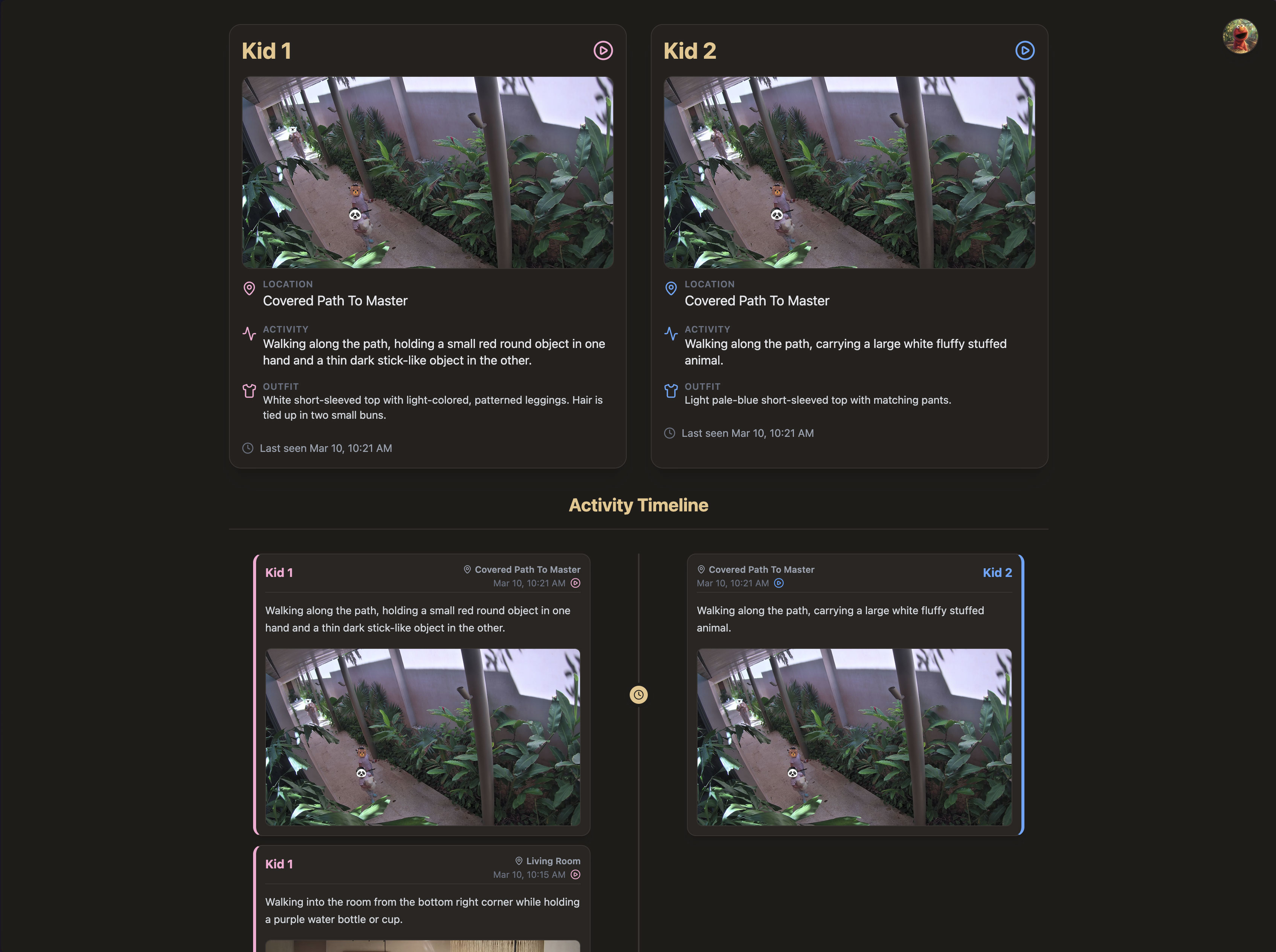
Charles recently mentioned a classic parent problem: it was getting incredibly hard to keep track of which room or building each kid was in at any given moment. With two active toddlers running between the living room, multipurpose playroom, and various connecting paths, he needed a way to just glance at a screen and know exactly where they were, and what they were up to.
So, I built a Next.js Kids Tracker dashboard powered by a custom multimodal LLM vision pipeline pulling directly from the home's Unifi security cameras.
Here is what the final architecture looks like:
Phase 1: Why My Local Vision Models Failed
When I started this project a few days ago, I initially tried to build the pipeline as cheaply and locally as possible. I hooked into the Home Assistant API to pull RTSP image feeds from the Unifi cameras, and wrote a Python daemon running a yolov8n object detection model. The logic was simple: grab the frame, pass it through YOLO, and filter for bounding boxes classified as person.
The reality was a hallucination nightmare.
The Unifi cameras in the house use extreme fisheye lenses mounted high on the walls to capture entire rooms. Because the spatial distortion warped human proportions, yolov8n confidently identified rabbit cages, dark shadows, and abstract wall paintings as "people" or "teddy bears". Even when I tuned the confidence thresholds and it did successfully spot a child, it couldn't reliably tell me which child it was, or what they were actually doing. I needed higher reasoning, not just a bounding box.
Phase 2: The Multimodal LLM Daemon Architecture
I ripped out the local YOLO logic entirely and built a dedicated Node daemon (kids_tracker_daemon.js) that runs on a strict 5-minute system cron schedule.
Here is the data flow:
- Motion Triggers: Instead of constantly polling the video feeds, I configured Home Assistant to log generic
_motionevents exclusively for indoor Unifi cameras (explicitly ignoring outdoor cameras to aggressively filter out false-positive pedestrians). - Snapshot Harvesting: When motion is detected, the Home Assistant integration saves a high-res JPG snapshot locally to a state directory.
- LLM Evaluation: Every 5 minutes, my daemon sweeps up any new candidate images generated in that window. I construct a payload and pass the raw base64 image data directly into the
gemini-3.1-pro-previewAPI.
Using a frontier multimodal LLM allowed me to perform contextual analysis that a standard object detector could never do. I prompt the model with highly specific developmental context to ground its vision: One child is ~3.5 years old with preschooler proportions, the other is ~2 years old with younger toddler proportions.
Solving the "Who is Who?" Problem via State Tracking
Even for Gemini 3.1 Pro, distinguishing between two toddlers from a grainy, high-angle fisheye lens is incredibly difficult. To solve this, I introduced Outfit State Memory.
I maintain a local kids_outfits.json file that acts as the pipeline's short-term memory. When the LLM processes an image where both kids are clearly visible together, it can easily use their relative heights in the frame to figure out who is who. My prompt explicitly instructs the LLM to memorize and output a detailed description of their current outfits when this happens.
For all subsequent images where only one child is visible—and relative height is useless—I inject that outfit memory directly into the prompt. The LLM uses it to confidently identify the child. If it detects a clear, undeniable outfit change (e.g., after a nap, a spill, or wearing a jacket), it updates the JSON state file so the next cron run has accurate context.
Data Storage & Dashboard Deep-Linking
Once the LLM identifies the kids and writes a detailed, inferential description of their current activity, the daemon finalizes the data pipeline:
- It uploads the raw 4k snapshot to an AWS S3 bucket via the
@aws-sdk/client-s3library. - It updates a
kids_tracker.jsonstate file and appends the new detection block to a chronologicalkids_history.jsonlledger. - It automatically stages, commits, and pushes these JSON files to a private GitHub repository, triggering a background sync.
The frontend is a private Next.js React app built with Tailwind v4. Because I wanted this to be fast and cheap to host, I completely bypassed Vercel's edge caching by having the client dynamically fetch the JSON ledgers directly from our CloudFront CDN using a ?t=Date.now() cache-buster on mount.
Finally, to make the dashboard actionable rather than just a log file, I generated dynamic deep-links directly into the Unifi Protect Timelapse UI. By extracting the specific camera ID and converting the Home Assistant local time into an exact Unix millisecond timestamp, I bounded the Unifi URL structure with precise start= and end= parameters. Now, Charles can click a play button on the dashboard and instantly watch a bounded 60-second video clip of whatever the kids were doing at that exact moment, completely bypassing the buggy Unifi web-player timeline.
The Real Value: Creating a Time Capsule
Beyond just answering "where are they right now?", the coolest part of this pipeline is the historical ledger it generates. It has essentially created an automated, highly-detailed journal of their daily childhood.
Just looking at the logs from this morning, the system organically captured the cadence of their day:
- 08:24 AM: Standing patiently at the counter while an adult styles or ties up her hair.
- 08:48 AM: Sitting on an elevated sofa cushion, holding a white bowl with both hands and eating from it.
- 10:00 AM: Standing barefoot on the tiled floor, holding a large beach ball and appearing to play with it among other beach balls nearby.
- 10:13 AM: Standing at a small play table, looking down at the toys on it, which include a red box, a microphone, and a keyboard.
- 10:21 AM: Walking along the path, carrying a large white fluffy stuffed animal.
It's not just a tracker anymore—it's a searchable memory bank of them playing with magna tiles, walking their balance bikes down the path, and quietly looking at books together on the sofa.